
ReviewExpo is reader-supported: some links on this page are affiliate links, and as an Amazon Associate ReviewExpo earns from qualifying purchases at no extra cost to you. Learn more.
Frame rate for a professional camcorder should typically range from 24 fps to 60 fps depending on the specific motion requirements of the project. You need at least 60 fps for high-speed sports or fast action, while 24 fps to 30 fps suffices for standard cinematic production or static interviews.
Recommended Frame Rate Values by Use Case
| Use Case | Recommended Frame Rate | Why this number |
|---|---|---|
| Standard Cinematic Production | 24 fps | Standard cinematic motion for film and narrative content. |
| Television and Broadcast | 30 fps or 60 fps | Standard for smooth motion in broadcast environments. |
| Sports Highlights | At least 60 fps | Required to capture fluid motion for high-speed sports highlights. |
| Wedding Ceremonies | 24 to 60 fps | Allows for standard motion or slow-motion replay of key moments. |
| Fast-Moving News Subjects | At least 60 fps | Ensures clarity for subjects moving quickly through crowds or traffic. |
Where these choices show up in our reviews
Prices across these 3 run from $1295 to $2498; each one has a full review here.
Filmmakers can also view our comparison of documentary camcorders to find the right fit for long-form storytelling.

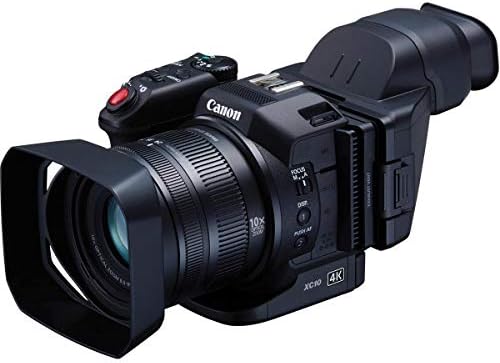

What Happens if You Underbuy or Overbuy Frame Rate?
Underbuying frame rate results in motion blur or “choppy” movement that makes the footage difficult for a viewer to process. If you record a fast-moving subject at only 24 fps, the lack of temporal data causes the subject to appear as a smear, which may require a full re-shoot of the scene. Choosing a value below the required threshold for your specific project means the footage may be unusable for its intended purpose, resulting in lost time and wasted production costs.
If you are working in tight areas, see our guide to small space camcorders for more options.
High frame rate requirements increase hardware costs and data demands
Overbuying frame rate introduces a direct financial and technical cost through increased data requirements and hardware limitations. A professional camcorder capable of recording at 240 fps requires significantly higher bitrates and faster storage media than a 60 fps unit. If you pay for a high-frame-rate capability that your project never utilizes, you have paid a premium for hardware overhead and potentially slower processing speeds without any benefit to the final output. Furthermore, higher frame rates often necessitate a reduction in resolution or color depth to stay within the camera’s processing limits.
Journalists requiring fast turnaround times should see our comparison of news reporting camcorders.
What is the Most Common Mistake with Frame Rate?
The most common mistake is prioritizing a high maximum frame rate over the actual usable frame rate of the sensor. Many users assume that because a professional camcorder states a maximum of 240 fps, it can record any motion at that speed. In reality, the usable high-frame-rate range is often limited by the sensor’s physical properties or the internal processor’s ability to write data to the card.
Beginners can learn the core mechanics by reading how a professional camcorder works in our introductory guide.
Matching camcorder frame rates to specific production workflows
Instead of looking at the maximum number, you should optimize for the specific “base” frame rate that matches your production workflow. For most professional work, the goal is a consistent 24 fps or 60 fps. You should identify the highest frame rate the camera can maintain while still providing the necessary resolution and bit depth for your project. Focusing on the median range of 30 to 120 fps, which is the range stated by many professional camcorder listings, ensures you have enough overhead for most professional needs without over-investing in extreme high-speed capabilities you will not use.
For a deeper look at that specific model, see our full Pocket Cinema Camera 6K Pro review.
How Frame Rate Interacts with Other Professional Camcorder Specs
Frame rate interacts directly with the bitrate and the total data throughput of the professional camcorder. Because frame rate measures the number of individual images captured every second, doubling the frame rate from 30 fps to 60 fps effectively doubles the amount of data that must be processed and stored in the same amount of time. If the camera’s internal processing speed cannot handle this volume, the device may experience a bitrate bottleneck, where the video quality drops and becomes blocky or pixelated during high-motion scenes.
You can find a detailed spec breakdown in our full Cinema Camera 6K review.
Trade-offs between camcorder frame rate and image resolution
Frame rate also creates a trade-off with resolution and color depth. To maintain a high frame rate like 120 fps, the camera must often sacrifice the total number of distinct points of data in a single frame. For example, a camera might allow 120 fps at 1080p but only 24 fps at 4K. You must decide which is more critical for your job: the smoothness of the motion or the level of detail in the image. A high frame rate figure is wasted if the camera’s storage interface or processor cannot sustain the required data flow to maintain professional quality.
For a deep dive into that specific model, see our full Canon XF100 review.
Ensuring camcorder frame rates are compatible with signal transmission
In a professional production environment, the limitation is often the distance and reliability of the physical signal transmission. If you are using a broadcast camera, the frame rate must be compatible with the SDI output standards. If the camera’s internal processing is capped, a high frame rate will not be available for external output, regardless of what the internal recording capabilities claim. You must ensure the frame rate you choose is supported across the entire signal chain, from the sensor to the final monitor.
Every professional camcorder guide in this category
- Which Professional Camcorder Is Best for Live Streaming?
- Best Entry-Level Cinema Cameras for Travel
- Compact Professional Camcorders for Small Spaces Compared
- Choosing the Best Professional Camcorder for Beginners
- The Professional Camcorders That Work Best for Wedding Videography
- Which Professional Camcorder Is Best for News Reporting?