
ReviewExpo is reader-supported: some links on this page are affiliate links, and as an Amazon Associate ReviewExpo earns from qualifying purchases at no extra cost to you. Learn more.
Frame rate for a vr camera should be between 30 and 60 FPS depending on the intended motion of the recorded scene. You need at least 30 FPS for standard immersive video, but high-action captures require a 60 FPS threshold to prevent motion blur and ensure a smooth viewing experience for the user.
Recommended Frame Rate Values for Vr Cameras
| Use Case | Recommended Frame Rate | Why this number |
|---|---|---|
| Static 360 Recording | 30 FPS | 30 FPS provides the minimum standard for smooth playback in stationary environments. |
| Walking Tours | 30 to 45 FPS | Human walking speeds require a baseline of 30 FPS to avoid jitter in the 360-degree view. |
| Action Sports | 60 FPS | Fast movements require 60 FPS to maintain visual clarity and reduce motion blur. |
| Professional VR Content | 60 FPS | The industry standard for high-quality VR content is 60 FPS to match standard display refresh rates. |
| High-Speed Motion | Over 60 FPS | Capturing extremely fast objects requires higher rates, though storage and processing limits often cap this at 60 FPS. |
Where these choices show up in our reviews
Prices across these 3 run from $119.98 to $598.98; each one has a full review here.


What Happens if You Underbuy or Overbuy Frame Rate?
Underbuying frame rate results in choppy, “stuttering” footage that causes motion sickness for viewers in a virtual reality environment. If the vr camera records at 24 FPS or lower, the rapid head movements inherent in 360-degree viewing will create visible jumps between frames. This makes the footage difficult to watch for more than a few seconds, effectively rendering the video unusable for immersive purposes.
High frame rates increase file sizes and storage depletion for vr cameras
Overbuying frame rate leads to significantly higher file sizes and faster storage depletion without a proportional increase in visual quality. If you record at 60 FPS when 30 FPS suffices, the amount of digital data the device must process doubles. This can lead to shorter recording times, increased heat generation, and the need for more expensive, high-capacity storage media. For a vr camera, the jump from 30 to 60 FPS is the primary point of diminishing returns for most non-professional users.
The Mistake Most Buyers Make with Vr Camera Frame Rate
The most common mistake is assuming that a higher frame rate automatically improves the clarity of the image. Frame rate measures the number of individual images displayed every second, not the total count of individual color points on the display. A vr camera with a high frame rate but low resolution will produce a smooth but blurry image where small details are indistinguishable.
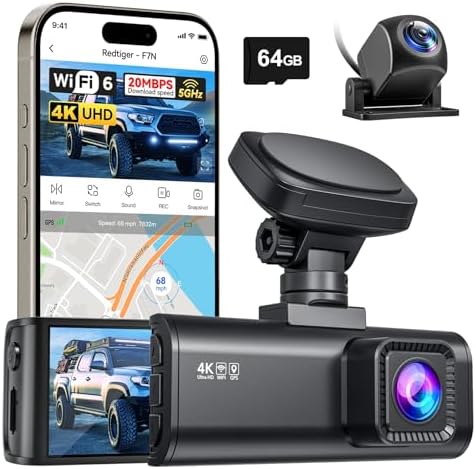
For a detailed spec breakdown, read our full REDTIGER F7N review.
Prioritizing resolution over frame rate ensures clear 360-degree textures
Buyers should optimize for resolution and bit depth before prioritizing extreme frame rates. Because 360-degree video requires stitching multiple feeds together, a high frame rate is only useful if the underlying resolution is sufficient to maintain texture across the sphere. If the resolution is too low, a high frame rate simply makes a blurry image move more smoothly. Prioritize a resolution that meets your target viewing distance before selecting a higher FPS threshold.
How Frame Rate Interacts with Other Vr Camera Specs
Frame rate interacts with storage capacity and processing power as the primary limiting factors for performance. Because each frame in a 360-degree video contains massive amounts of data, a high frame rate requires a high-speed write speed from the internal memory. If the vr camera’s processing speed cannot keep up with the 60 FPS requirement, the camera may drop frames or shut down due to thermal throttling.
Sustained high-frame-rate recording requires hardware that resists thermal throttling
Thermal throttling occurs when high-bitrate encoding causes the camera to heat up and reduce its performance to protect the hardware. High-frame-rate recording generates more heat because the processor must work faster to encode more images per second. When choosing a vr camera, ensure the hardware is rated for sustained high-frame-rate recording to avoid the camera stopping mid-take. A camera that can hit 60 FPS for ten seconds but throttles to 30 FPS after one minute is not suitable for long-form content.
Encoding standards must support the required bitrate and frame rate
Frame rate also dictates the required bitrate efficiency. High-resolution 360-degree textures require a high bitrate to remain sharp. If the vr camera’s encoding standard, such as H.265 (HEVC), is not capable of handling the data at your desired frame rate, the video will suffer from compression artifacts or “blocky” textures. Always verify that the camera’s specific encoding standard supports the frame rate you need at the resolution you intend to record.
We provide a detailed spec breakdown in our full Vantrue N2 Pro review.
Choosing between resolution and frame rate depends on the specific use case
When two requirements conflict, such as needing high resolution and high frame rate but having limited storage, you must decide on your primary use case. For a walking tour, you can prioritize resolution over frame rate, as the movement is slow enough for 30 FPS to feel fluid. For an action sequence, you must prioritize frame rate, even if it means slightly lower resolution, to ensure the motion remains clear. Choosing the wrong priority results in footage that is either too blurry to see or too choppy to watch.
Selecting a 30 FPS threshold helps prevent vr camera overheating
A user might find themselves in a situation where the camera feels heavy or hot after just a few minutes of recording. This is often because the chosen frame rate exceeds the device’s sustained thermal limits. If you need to record long takes, a 30 FPS threshold is often the safest way to ensure the camera remains operational without overheating. For those who need 60 FPS, look for hardware specifically designed for high-bitrate, high-frame-rate output to ensure the device can handle the sustained load.
Insufficient frame rates result in unusable footage that requires a re-shoot
Choosing a vr camera with an insufficient frame rate for your needs results in unusable footage that requires a full re-shoot. If the frame rate is too low for the movement captured, the only solution is to record the scene again with a different device or settings. By following the data-driven thresholds above, you ensure the hardware is capable of producing the fluid, immersive experience required for 360-degree video.